Array type
In AskiaScript, an array is a variable which contains a collection of data items that can be selected by indices computed at run-time.
- Methods:
Avg()
IndexOf()
IndexOfMax()
IndexOfMin()
Insert()
InsertAt()
Join()5.3.3
LoadJSON()Proposal for 5.4.8
Max()
Merge()
Min()
Push()
Remove()
RemoveAt()
RemoveDuplicates()Proposal for 5.4.8
SelectRandom()
SetAt() 5.3.3
Shuffle()
Sort()
SortDesc()
StdDev()
StdDevEst() 5.3.5
Sum()
ToString()
TypeOf()
Creation
Array of numbers
Assign a set of number values (also an empty set) between curly brackets ({}) and separated by semi colon (;)
dim my_array = {} " Array of number by default
dim my_numerical_array = {1;2;3}
my_array.count returns 0. You can also use two other keywords to create a numerical array, as follows:|
Name |
Description | Example |
|---|---|---|
| To | Use this function to specify a range of values without listing every individual value within the range, thereby saving time and improving the legibility of your Askia scripts. |
dim my_array = {1 to 10;12;15 to 20}
|
| Range(LowerBound,UpperBound) | Use this function to span across a set's values, thereby enabling you to save time, and improving the legibility of your Askia scripts. |
dim my_array = Range(1,10) |
Array of strings
Assign a set of string values between curly brackets ({}) and separated by semi colons (;). Each string value should be encapsulated between double quotes (").
  dim my_array = {""} " Array of string
  dim my_string_array = {"a";"b";"c"}
Array of variants: Proposal for 5.4.8
The creation of an array of variant is done by the assignment of a literal notation of a variant array to a variable or by declaring a variable as an array of variant.
[] which represent the AskiaScript Accessor, we've decide to prefix the first open square-bracket by a @ character.All subsequent instances of the square-bracket
[] and curly-brace {} do not need to be prefixed by the @characters, and will always refer respectively to the Array and Dictionary.Declaring a variant Array
  Dim myValue As Array
  Dim my_array = @[]
  Dim my_variant_array = @[1,2,3]
  Dim my_other_variant_array = @[True,2,"toto"]
, and not the semi-colon ;
Accessor
[index]
Accessor of data. Returns the data at the specified index. This accessor property is used without the dot period (.)
Parameters
- - index [Required] {Number} Index (1 based) of response to obtain
Returns a Number, String or Variant according to the type of array
Examples
  dim my_array = {3;4}
  my_array[2]  ' => 4 (Number)
  dim my_string_array = {"aa";"bb"}
  my_string_array[2]  ' => bb (String)
  dim my_variant_array = @[2,5]
  my_variant_array[2]  ' => 5 (Variant)
  dim my_second_variant_array = @[True,"cc",3]
  my_second_variant_array[2]  ' => cc (Variant)
Reference vs. Value
Dictionary or an Array, the accessor returns the object itself (reference) and not a copy it (value). It means that modifying the array itself, will modify the value. Be careful, the modification is different than a re-assignment.
  Dim user As Array = @[
    "John Doe",
    1,
    #31/12/1975#,
    True,
    ["Google Chrome", "Firefox"],
    {
      "address" : "Street Unknown, 1st. 99999 Fake city",
      "email"   : "johndoe@anonymous.com",
      "phone"   : "+00 01 99 01 99 00 00"
    },
    Null
  ]
Dim browsers = user[5]
  ' Modification
  browsers.Push("MS Edge") '=> @["Google Chrome", "Firefox", "MS Edge"]
  ' user[5]                '=> @["Google Chrome", "Firefox", "MS Edge"]
Dim browsers2 = user[5]
  ' Modification
  browsers2.Push("Safari") '=> @["Google Chrome", "Firefox", "MS Edge", "Safari"]
  ' browsers               '=> @["Google Chrome", "Firefox", "MS Edge", "Safari"]
  ' browsers2              '=> @["Google Chrome", "Firefox", "MS Edge", "Safari"]
  ' user[5]                '=> @["Google Chrome", "Firefox", "MS Edge", "Safari"]
  ' Re-assigment
  browsers2 = @["Internet Explorer"]
  ' browsers               '=> @["Google Chrome", "Firefox", "MS Edge", "Safari"]
  ' browsers2              '=>  @["Internet Explorer"]
  ' user[5]                '=> @["Google Chrome", "Firefox", "MS Edge", "Safari"]
Properties
Count
Returns the number of items in the collection
Return a Number
  dim my_number_array = {3;4}
  my_number_array.Count ' => 2
  dim my_string_array = {"bb";"dd"}
  my_string_array.Count ' => 2
  dim my_variant_array = @[2,5]
  my_variant_array.Count ' => 2
Methods
Avg()
Only available for an array of numbers or array of variants.
This is askiascript's abbreviation for average.
Calculate the numerical average of numerical data.
Returns 0 when the array is empty.
Return a Number
  dim arr = {2;4}
  arr.Avg() ' => 3
  dim emptyArray = {1;2}
  emptyArray.Remove({1;2})
  emptyArray.Avg() ' => 0
  dim variantArr = @[2,4]
  variantArr.Avg() ' => 3
  dim variantArr = @["bb","cc"]
  variantArr.Avg() ' => 0
  dim secondVariantArr = @[True,4,"bb"]
  secondVariantArr.Avg() ' => 2.5
Sum()
Only available for an array of numbers or array of variants.
Calculate the numerical sum of numerical data.
Returns 0 when the array is empty.
Return a Number
  dim arr = {2;4}
  arr.Sum() ' => 6
  dim emptyArray = {1;2}
  emptyArray.Remove({1;2})
  emptyArray.Sum() ' => 0
  dim variantArr = @[2,4]
  variantArr.Sum() ' => 6
  dim variantArr = @["bb","cc"]
  variantArr.Sum() ' => 0
  dim secondVariantArr = @[True,4,"bb"]
  secondVariantArr.Sum() ' => 5
StdDev()
Only available for an array of numbers or array of variants.
This is askiascript's abbreviation for standard deviation.
Calculate the numerical standard deviation of numerical data.
Returns 0 when the array is empty.
The formula used is the following:

  dim arr = {10;20;50;75;88}
  arr.StdDev() ' => 30.19668856017163
  dim emptyArray = {1;2}
  emptyArray.Remove({1;2})
  emptyArray.StdDev() ' => 0
  dim variantArr = @[10,20,50,75,88]
  variantArr.StdDev() ' => 30.19668856017163
  dim variantArr = @["bb","cc"]
  variantArr.StdDev() ' => 0
  dim secondVariantArr = @[True,4,"bb"]
  secondVariantArr.StdDev() ' => 1.5
StdDevEst()
Only available for an array of numbers or array of variants.
This is askiascript's abbreviation for standard deviation estimator.
Calculate the numerical standard deviation estimator of numerical data.
Returns 0 when the array is empty.
The formula used is the following: 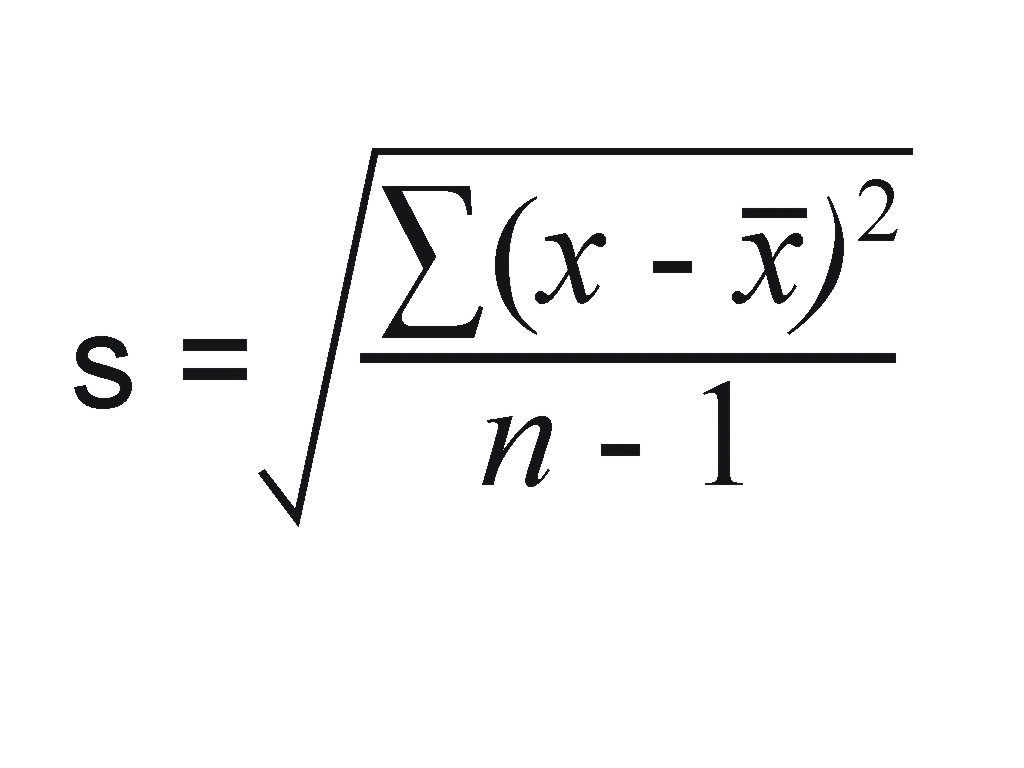
  dim arr = {10;20;50;75;88}
  arr.StdDevEst() ' => 33.760924157967
  dim emptyArray = {1;2}
  emptyArray.Remove({1;2})
  emptyArray.StdDevEst() ' => 0
  dim variantArr = @[10,20,50,75,88]
  variantArr.StdDevEst() ' => 33.760924157967
  dim variantArr = @["bb","cc"]
  variantArr.StdDevEst() ' => 0
  dim secondVariantArr = @[True,4,"bb"]
  secondVariantArr.StdDevEst() ' => 2.12132034355964
Min([nthLowest])
@developer: Seems that the current implementation only works with array of numbers.
It should also works for an array of string and array of variant Proposal for 5.4.8
Returns the nth smallest value.
Returns DK when the nthLowest is out of bound for Number Array.
Returns "" when the nthLowest is out of bound for String Array.
Returns Null when the nthLowest is out of bound for Variant Array.
Parameters
- nthLowest [optional] {Number} Indicates the nth lowest value to obtain (1 by default)
Return a Number or String or Variant
  dim arr = {3;4;1}
  arr.Min() ' => 1
  arr.Min(2) ' => 3
  arr.Min(4) ' => DK (Out of bound)
  dim arr = {"e";"a";"c"}
  arr.Min() ' => a (String)
  arr.Min(2) ' => c (String)
  arr.Min(4) ' => "" (Out of bound)
  dim arr = @[True,"ab",["b","c"],3,["a","b"],0,"Ab",False,{"a":"b"},1,#30/12/1899#,#12/02/2005#,5,[0,1,2,3]]
  ' arr sorted is @[False,0,#30/12/1899#,True,1,3,5,#12/02/2005#,"Ab","ab",{"a":"b"},[0,1,2,3],["a","b"],["b","c"]]
  arr.Min() ' => False (Variant)
  arr.Min(7) ' => 5 (Variant)
  arr.Min(16) ' => Null (Out of bound)
Max([nthHighest])
@developer: Seems that the current implementation only works with array of numbers.
It should also works for an array of string and array of variant Proposal for 5.4.8
Returns the nth highest value.
Returns DK when the nthHighest is out of bound for Number Array.
Returns "" when the nthHighest is out of bound for String Array.
Returns Null when the nthHighest is out of bound for Variant Array.
Parameters
- nthHighest [optional] {Number} Indicates the nth highest value to obtain (1 by default)
Return a Number or String or Variant
  dim arr = {3;4;1}
  arr.Max() ' => 4
  arr.Max(2) ' => 3
  arr.Max(4) ' => DK (Out of bound)
  dim arr = {"e";"a";"c"}
  arr.Max() ' => e (String)
  arr.Max(2) ' => c (String)
  arr.Max(4) ' => "" (Out of bound)
  dim arr = @[True,"ab",["b","c"],3,["a","b"],0,"Ab",False,{"a":"b"},1,#30/12/1899#,#12/02/2005#,5,[0,1,2,3]]
  ' arr sorted is @[False,0,#30/12/1899#,True,1,3,5,#12/02/2005#,"Ab","ab",{"a":"b"},[0,1,2,3],["a","b"],["b","c"]]
  arr.Max() ' => ["b","c"] (Variant)
  arr.Max(9) ' => 3 (Variant)
  arr.Max(16) ' => Null (Out of bound)
IndexOfMin([nthLowest])
@developer: Seems that the current implementation only works with array of numbers.
It should also works for an array of string and array of variant Proposal for 5.4.8
Returns the index of the nth smallest value.
Returns DK when the nthLowest is out of bound.
Parameters
- nthLowest [optional] {Number} Indicates the nth lowest value to obtain (1 by default)
Return a Number
  dim arr = {10;20;3;1}
  arr.IndexOfMin() ' => 4
  arr.IndexOfMin(2) ' => 3
  arr.IndexOfMin(5) ' => DK (Out of bound)
  dim arr = {"e";"a";"c"}
  arr.IndexOfMin() ' => 2
  arr.IndexOfMin(2) ' => 3
  arr.IndexOfMin(4) ' => DK (Out of bound)
  dim arr = @[True,"ab",["b","c"],3,["a","b"],0,"Ab",False,{"a":"b"},1,#30/12/1899#,#12/02/2005#,5,[0,1,2,3]]
  ' arr sorted is @[False,0,#30/12/1899#,True,1,3,5,#12/02/2005#,"Ab","ab",{"a":"b"},[0,1,2,3],["a","b"],["b","c"]]
  arr.IndexOfMin() ' => 8
  arr.IndexOfMin(7) ' => 13
  arr.IndexOfMin(16) ' => DK (Out of bound)
IndexOfMax([nthHighest])
@developer: Seems that the current implementation only works with array of numbers.
It should also works for an array of string and array of variant Proposal for 5.4.8
Returns the index of the nth highest number.
Returns DK when the nthHighest is out of bound.
Parameters
- nthHighest [optional] {Number} Indicates the nth highest value to obtain (1 by default)
Return a Number
  dim arr = {10;20;3;1}
  arr.IndexOfMax() ' => 2
  arr.IndexOfMax(2) ' => 1
  arr.IndexOfMax(5) ' => DK (Out of bound)
  dim arr = {"e";"a";"c"}
  arr.IndexOfMax() ' => 1
  arr.IndexOfMax(2) ' => 3
  arr.IndexOfMax(4) ' => DK (Out of bound)
  dim arr = @[True,"ab",["b","c"],3,["a","b"],0,"Ab",False,{"a":"b"},1,#30/12/1899#,#12/02/2005#,5,[0,1,2,3]]
  ' arr sorted is @[False,0,#30/12/1899#,True,1,3,5,#12/02/2005#,"Ab","ab",{"a":"b"},[0,1,2,3],["a","b"],["b","c"]]
  arr.IndexOfMax() ' => 3
  arr.IndexOfMax(7) ' => 12
  arr.IndexOfMax(16) ' => DK (Out of bound)
IndexOf(data [,caseSensitive])
Search the data in the array and returns his position (based 1)
Returns DK if the data is not found
Parameters
- data [Require] {String, Number, Date, Boolean, Variant, Array, Dictionary, Null} Any basic types to search
- caseSensitive [optional] {Boolean} Only available for an array of strings.
When true indicates if the search must be case sensitive
(by default the search is not case sensitive)
Return a Number
  dim arr= {2;4;5;1;3}
  arr.IndexOf(4) ' => 2
  dim arr= {2;4;5;1;3}
  arr.IndexOf(10) ' => DK (not found)
  dim arr = {"b";"a";"c"}
  arr.IndexOf("a") ' => 2
  dim arr = {"abc"; "ABC"}
  arr.IndexOf("aBc", true) ' => DK (not found)
  dim arr = {"abc"; "ABC"}
  arr.IndexOf("ABC", true) '=> 2
  dim arr = @[True,"ab",["b","c"],3,["a","b"],0,"Ab",False,{"a":"b"},1,#30/12/1899#,#12/02/2005#,5,[0,1,2,3]]
  arr.IndexOf(["a","b"]) ' => 5
  arr.IndexOf(["A","B"]) ' => 5
  arr.IndexOf(["A","B"], true) ' => DK (not found)
  arr.IndexOf("Ab") ' => 2
  arr.IndexOf("ab") ' => 2
  arr.IndexOf("Ab", true) ' => 7
  arr.IndexOf(#30/12/1899#) ' => 11
  arr.IndexOf("invalid value") ' => DK (not found)
Shuffle([seed])
This method modify the object in place.
Sort a list of data from an array into a random order.
Parameters
- seed [Optional] {Number} Any number to reapply the same order for another Shuffle in the same interview scope
Return an Array of Number or String or Variant
  dim arr = {1;2;3;4;5}
  arr.Shuffle( ) ' => arr
  return arr ' => {2;4;5;1;3}
  dim arr1 = {1;2;3;4;5}
  arr1.Shuffle( 17 ) ' => arr1 ({3;1;2;5;4})
  dim arr2 = {11;22;33;44;55}
  arr2.Shuffle( 17 ) ' => arr2 ({33;11;22;55;44})
  dim arr = {"a";"b";"c";"d";"e"}
  arr.Shuffle( ) ' => arr
  return arr ' => {"b";"d";"e";"a";"c"}
  dim arr1 = {"a";"b";"c";"d";"e"}
  arr1.Shuffle( 17 ) ' => arr1 ({"c";"a";"b";"e";"d"})
  dim arr2 = {"aa";"bb";"cc";"dd";"ee"}
  arr2.Shuffle( 17 ) ' => arr2 ({"cc";"aa";"bb";"ee";"dd"})
  dim arr = @[True,["b","c"],3,["a","b"],0,False,{"a":"b"},1,#30/12/1899#,#12/02/2005#,5,[0,1,2,3]]
  arr.Shuffle() ' => arr (@[["a","b"],[0,1,2,3],["b","c"],#30/12/1899#,3,0,#12/02/2005#,True,False,{"a":"b"},1,5])
SelectRandom([count])
Randomly select a specified number of values from an existing array.
Parameters
- count [Optional] {Number} Indicates the number of value to select (1 by default)
Return an Array of Number or String or Variant
  dim arr = {2;4;5;1;3}
  arr.SelectRandom() ' => {4}
  dim arr = {2;4;5;1;3}
  arr.SelectRandom(2) ' => {2;5}
  dim arr = {"b";"a";"c"}
  arr.SelectRandom(2) ' => {"b";"c"}
  dim emptyArray = {}
  emptyArray.SelectRandom() ' => {}
  dim arr = @[True,["b","c"],3,["a","b"],0,False,{"a":"b"},1,#30/12/1899#,#12/02/2005#,5,[0,1,2,3]]
  arr.SelectRandom(3) ' => @[[0,1,2,3],3,False]
Insert(data)
This method modify the object in place.
Add a set of data allowing repetition (with duplicates) at the end of the array
Parameters
- data [Require] {Array, Number, String, Boolean, Date, Variant, Null, Dictionary} Data to add into the current array
If you want to execute multiple operations in multiple lines, write a complete operations sentence on each line (see 'Chains calls examples').
Return an Array of Number or String or Variant
  dim arr = {2;4}
  arr.Insert({1;4}) ' => arr
  return arr ' => {2;4;1;4}
  dim arr = {"b";"a"}
  arr.Insert({"c";"a"}) ' => arr
  return arr ' => {"b";"a";"c";"a"}
  dim arr = {2;4}
  arr.Insert(5) ' => arr
  return arr ' => {2;4;5}
  dim arr = @[2,4]
  arr.Insert({1;4}) ' => arr
  return arr ' => @[2,4,1,4]
  dim arr = @[2,4]
  dim arr2 As Array = @[1,4]
  arr.Insert(arr2) ' => arr
  return arr ' => @[2,4,1,4]
  dim arr = @[2,4]
  dim arr2 As Variant = @[1,4]
  arr.Insert(arr2) ' => arr
  return arr ' => @[2,4,[1,4]]
  dim arr = @[2,4]
  arr.Insert(@[1,4]) ' => @[1,4] is a variant array
  return arr ' => @[2,4,1,4]
  dim arr = @[2,4]
  arr.Insert(@[1,["toto",Null,3]]) ' => arr
  return arr ' => @[2,4,1,["toto",Null,3]]
Chains calls examples:
  ' Legal syntaxes in single line:
  dim my_array = {1; 2}
  my_array.Insert(3) + {4}     ' => returns {1; 2; 3; 4} but my_array returns {1; 2; 3}
  my_array.Insert(5).Insert(6) ' => my_array with values {1; 2; 3; 5; 6}
  ' Illegal syntaxes in multiline:
  dim my_array = {1; 2}
  my_array.Insert(3)
  +
  {4}  ' => Compilation error
  dim my_array = {1;2}
  my_array.Insert(5)
  .Insert(6) ' => Compilation error
  ' Legal syntaxes in multiline:
  dim my_array = {1; 2}
  my_array.Insert(3)
  my_array = my_array + {4} ' => my_array with values {1;2;3;4}
  my_array.Insert(5)        ' => my_array with values {1;2;3;4;5}
  my_array.Insert(6)        ' => my_array with values {1;2;3;4;5;6}
InsertAt(index, data)
This method modify the object in place.
Add a set of data allowing repetition (with duplicates) at the specify index
Parameters
- index [Require] {Number} Indicates at which position (based 1) the data should be insert.
If the index is inferior to 1 it will be converted to 1.
If the index is superior than the size of the array it will be converted to the size of the array (add at the end)
- data [Require] {Array, Number, String, Boolean, Date, Variant, Null, Dictionary} Data to add into the current array.
If you want to execute multiple operations in multiple lines, write a complete operations sentence on each line (see 'Chains calls examples')
Return an Array of Number or String or Variant
  dim arr = {2;4}
  arr.InsertAt(2, {1; 3}) ' => arr
  return arr  ' => {2;1;3;4}
  dim arr = {"b";"a"}
  arr.InsertAt(1, {"c";"a"}) ' => arr
  return arr ' => {"c";"a";"b";"a"}
  dim arr = @[2,4]
  arr.InsertAt(2, {1; 3}) ' => arr
  return arr  ' => @[2,1,3,4]
  dim arr = @["b","a"]
  arr.InsertAt(1, {"c";"a"}) ' => arr
  return arr ' => @["c","a","b","a"]
  dim arr = @[2,4]
  dim arr2 As Array = @[1,["titi",3]]
  arr.InsertAt(2, arr2) ' => arr
  return arr  ' => @[2,1,["titi",3],4]
  dim arr = @[2,4]
  dim arr2 As Variant = @[1,["titi",3]]
  arr.InsertAt(2, arr2) ' => arr
  return arr  ' => @[2,[1,["titi",3]],4]
  dim arr = @[2,4]
  arr.InsertAt(2, @[1,["titi",3]]) ' => [1,["titi",3]] is a variant array
  return arr  ' => @[2,1,["titi",3],4]
Chains calls examples:
  ' Legal syntaxes in single line:
  dim my_array = {5; 6}
  my_array.InsertAt(1, {3; 4}) + {7}         ' => returns {3; 4; 5; 6; 7} but my_array returns {3; 4; 5; 6}
  my_array.InsertAt(1, {2}).InsertAt(1, {1}) ' => my_array with values {1; 2; 3; 4; 5; 6}
  ' Illegal syntaxes in multiline:
  dim my_array = {1; 2}
  my_array.InsertAt(1, {3; 4})
  +
  {7}  ' => Compilation error
  ' Illegal syntaxes in multiline:
  dim my_array.InsertAt(1, {2})
  .InsertAt(1, {1}) ' => Compilation error
  ' Legal syntaxes in multiline:
  dim my_array = {5; 6}
  my_array.InsertAt(1, {3; 4}) ' => my_array with values {3;4;5;6}
  my_array = my_array + {7}    ' => my_array with values {3;4;5;6;7}
  my_array.InsertAt(1, {2})    ' => my_array with values {2;3;4;5;6;7}
  my_array.InsertAt(1, {1})    ' => my_array with values {1;2;3;4;5;6;7}
SetAt(index, data)
5.3.3
This method modify the object in place.
Modify the data at the specify index
Parameters
- index [Require] {Number} Indicates at which position (based 1) the data should be modified
If the index is out of range, superior than the size of the array the new data will be inserted at the end of the array.
- data [Require] {Array, Number, String, Boolean, Date, Variant, Null, Dictionary} Data to set
If you want to execute multiple operations in multiple lines, write a complete operations sentence on each line (see 'Chains calls examples')
Return an Array of Number or String or Variant
  dim arr = {2;4}
  arr.SetAt(2, 3) ' => arr
  return arr  ' => {2;3}
  dim arr = {"b";"a"}
  arr.SetAt(1, "z") ' => arr
  return arr ' => {"z";"a"}
  dim arr = {1; 2}
  arr.SetAt(4, 5) ' => arr
  return arr ' => {1;2;5}
  dim arr = {2;4;5}
  arr.SetAt(2, {3;4} ) ' => arr
  return arr  ' => {2;3;4}
  dim arr = @[2,4]
  arr.SetAt(2, {1; 3}) ' => arr
  return arr  ' => @[2,1,3]
  dim arr = @["b","a"]
  arr.SetAt(1, {"c";"a"}) ' => arr
  return arr ' => @["c","a"]
  dim arr = @[2,4]
  dim arr2 As Array = @[1,["titi",3]]
  arr.SetAt(2, arr2) ' => arr
  return arr  ' => @[2,1,["titi",3]]
  dim arr = @[2,4]
  dim arr2 As Variant = @[1,["titi",3]]
  arr.SetAt(2, arr2) ' => arr
  return arr  ' => @[2,[1,["titi",3]]]
  dim arr = @[2,4]
  arr.SetAt(2, @[1,["titi",3]]) ' => [1,["titi",3]] is a variant array
  return arr  ' => @[2,1,["titi",3]]
Chains calls examples:
  ' Legal syntaxes in single line:
  dim my_array = {5; 6}
  my_array.SetAt(1, 4) + {7}       ' => returns {4;6;7} but my_array returns {4;6}
  my_array.SetAt(3, 0).SetAt(2, 2) ' => my_array with values {4; 2; 0}
  ' Illegal syntaxes in multiline:
  dim my_array = {1; 2}
  my_array.SetAt(1, 3)
  +
  {7}  ' => Compilation error
  ' Illegal syntaxes in multiline:
  dim my_array.SetAt(1, 3)
  .SetAt(2, 4) ' => Compilation error
  ' Legal syntaxes in multiline:
  dim my_array = {5; 6}
  my_array.SetAt(1, 2)
  my_array = my_array + {7}  ' => my_array with values {2;6;7}
  my_array.SetAt(1, 0)       ' => my_array with values {0;6;7}
  my_array.SetAt(2, 3)       ' => my_array with values {0;3;7}
Merge(data)
This method modify the object in place.
Merge the current array with the data without repetition
Equivalent to CurrentArray = CurrentArray + data
Or to CurrentArray = CurrentArray Union data
Parameters
- data [Require] {Array, Number, String, Boolean, Date, Variant, Null, Dictionary} Data to merge with the current array.
If you want to execute multiple operations in multiple lines, write a complete operations sentence on each line (see 'Chains calls examples')
Return an Array of Number or String or Variant
  dim arr = {2;4}
  arr.Merge({4;5;6}) ' => arr
  return arr '=> {2;4;5;6}
  dim arr = {"b";"a"}
  arr.Merge({"c";"a"}) ' => arr
  return arr ' => {"b";"a";"c"}
  dim arr = @[2,4]
  arr.Merge({4;5;6}) ' => arr
  return arr '=> @[2,4,5,6]
  dim arr = @[2,4]
  arr.Merge(@[4,5,6]) ' => arr
  return arr '=> @[2,4,5,6]
  dim arr = @["b",3,[1,"tata"],#22/05/2010#]
  dim arr2 As Array = @["c","b",7]
  arr.Merge(arr2) ' => arr
  return arr ' => @["b",3,[1,"tata"],#22/05/2010#,"c",7]
  dim arr = @["b",3,[1,"tata"],#22/05/2010#]
  dim arr2 As Variant = @["c","b",7]
  arr.Merge(arr2) ' => arr
  return arr ' => @["b",3,[1,"tata"],#22/05/2010#,["c","b",7]]
  dim arr = @["b",3,[1,"tata"],#22/05/2010#]
  arr.Merge(@["c","b",7]) ' => @["c","b",7] is a variant array
  return arr ' => @["b",3,[1,"tata"],#22/05/2010#,"c",7]
Chains calls examples:
  ' Legal syntaxes in single line:
  dim my_array = {1; 2}
  my_array.Merge({2; 3}) + {4}        ' => returns {1; 2; 3; 4} but my_array returns {1; 2; 3}
  my_array.Merge(2).Merge(3).Merge(4) ' => my_array with values {1; 2; 3; 4}
  ' Illegal syntaxes in multiline:
  dim my_array = {1; 2}
  my_array.Merge(3)
  +
  {4}  ' => Compilation error
  ' Illegal syntaxes in multiline:
  dim my_array = {1;2}
  my_array.Merge(5)
  .Merge(6) ' => Compilation error
  ' Legal syntaxes in multiline:
  dim my_array = {1; 2}
  my_array.Merge(3)
  my_array = my_array + {4} ' =>  my_array with values {1;2;3;4}
  my_array.Merge(5)         ' => my_array with values {1;2;3;4;5}
  my_array.Merge(6)         ' => my_array with values {1;2;3;4;5;6}
Remove(data)
This method modify the object in place.
It removes all elements which matches the data
Parameters
- data [Require] {Array, Number, String, Boolean, Date, Variant, Null, Dictionary} Data to remove in the current array
If you want to execute multiple operations in multiple lines, write a complete operations sentence on each line (see 'Chains calls examples' in the above methods .Insert and .InsertAt)
Return an Array of Number or String or Variant
  dim arr = {2;4;5;4;6}
  arr.Remove(4) ' => arr ' ({2;5;6})
  arr.Remove({2; 6}) ' => arr
  Return arr ' => {5}
  dim arr = {"b";"a";"c";"b"}
  arr.Remove("b") ' => arr
  return arr ' => {"a";"c"}
  dim arr = @[2,4,5,4,6]
  arr.Remove(4) ' => arr ' (@[2,5,6])
  arr.Remove({2; 6}) ' => arr
  Return arr ' => @[5]
  dim arr = @["b","a","c","b"]
  arr.Remove("b") ' => arr
  return arr ' => @["a","c"]
  dim arr = @[True,["b","c"],"bb",3,["a","b"],0,Null,False,{"a":"b"},"aa",1,#30/12/1899#,#12/02/2005#,5,[0,1,2,3]]
  dim arr2 As Array = @[["b","c"]]
  arr.Remove(arr2)' => arr
  return arr ' => @[True,"bb",3,["a","b"],0,Null,False,{"a":"b"},"aa",1,#30/12/1899#,#12/02/2005#,5,[0,1,2,3]]
  dim arr = @[True,["b","c"],"bb",3,["a","b"],0,Null,False,{"a":"b"},"aa",1,#30/12/1899#,#12/02/2005#,5,[0,1,2,3]]
  dim num As Number = 3
  arr.Remove(num)' => arr
  return arr ' => @[True,["b","c"],"bb",["a","b"],0,Null,False,{"a":"b"},"aa",1,#30/12/1899#,#12/02/2005#,5,[0,1,2,3]]
  dim arr = @[True,["b","c"],"bb",3,["a","b"],0,Null,False,{"a":"b"},"aa",1,#30/12/1899#,#12/02/2005#,5,[0,1,2,3]]
  dim str As String = "bb"
  arr.Remove(str)' => arr
  return arr ' => @[True,["b","c"],3,["a","b"],0,Null,False,{"a":"b"},"aa",1,#30/12/1899#,#12/02/2005#,5,[0,1,2,3]]
  dim arr = @[True,["b","c"],"bb",3,["a","b"],0,Null,False,{"a":"b"},"aa",1,#30/12/1899#,#12/02/2005#,5,[0,1,2,3]]
  dim bln As Boolean = False
  arr.Remove(bln)' => arr
  return arr ' => @[True,["b","c"],"bb",3,["a","b"],Null,{"a":"b"},"aa",1,#30/12/1899#,#12/02/2005#,5,[0,1,2,3]]
  dim arr = @[True,["b","c"],"bb",3,["a","b"],0,Null,False,{"a":"b"},"aa",1,#30/12/1899#,#12/02/2005#,5,[0,1,2,3]]
  dim dte As Date = #30/12/1899#
  arr.Remove(dte)' => arr
  return arr ' => @[True,["b","c"],"bb",3,["a","b"],0,Null,False,{"a":"b"},"aa",1,#12/02/2005#,5,[0,1,2,3]]
  dim arr = @[True,["b","c"],"bb",3,["a","b"],0,Null,False,{"a":"b"},"aa",1,#30/12/1899#,#12/02/2005#,5,[0,1,2,3]]
  dim nl = Null
  arr.Remove(nl)' => arr
  return arr ' => @[True,["b","c"],"bb",3,["a","b"],0,False,{"a":"b"},"aa",1,#30/12/1899#,#12/02/2005#,5,[0,1,2,3]]
  dim arr = @[True,["b","c"],"bb",3,["a","b"],0,Null,False,{"a":"b"},"aa",1,#30/12/1899#,#12/02/2005#,5,[0,1,2,3]]
  dim dct As Dictionary = @{"a":"b"}
  arr.Remove(dct)' => arr
  return arr ' => @[True,["b","c"],"bb",3,["a","b"],0,Null,False,"aa",1,#30/12/1899#,#12/02/2005#,5,[0,1,2,3]]
  dim arr = @[True,["b","c"],"bb",3,["a","b"],0,Null,False,{"a":"b"},"aa",1,#30/12/1899#,#12/02/2005#,5,[0,1,2,3]]
  dim arr2 As Variant = @[["b","c"]]
  arr.Remove(arr2)' => arr
  return arr ' => @[True,"bb",3,["a","b"],0,Null,False,{"a":"b"},"aa",1,#30/12/1899#,#12/02/2005#,5,[0,1,2,3]]
  dim arr = @[True,["b","c"],"bb",3,["a","b"],0,Null,False,{"a":"b"},"aa",1,#30/12/1899#,#12/02/2005#,5,[0,1,2,3]]
  dim num As Variant = 3
  arr.Remove(num)' => arr
  return arr ' => @[True,["b","c"],"bb",["a","b"],0,Null,False,{"a":"b"},"aa",1,#30/12/1899#,#12/02/2005#,5,[0,1,2,3]]
  dim arr = @[True,["b","c"],"bb",3,["a","b"],0,Null,False,{"a":"b"},"aa",1,#30/12/1899#,#12/02/2005#,5,[0,1,2,3]]
  dim str As Variant = "bb"
  arr.Remove(str)' => arr
  return arr ' => @[True,["b","c"],3,["a","b"],0,Null,False,{"a":"b"},"aa",1,#30/12/1899#,#12/02/2005#,5,[0,1,2,3]]
  dim arr = @[True,["b","c"],"bb",3,["a","b"],0,Null,False,{"a":"b"},"aa",1,#30/12/1899#,#12/02/2005#,5,[0,1,2,3]]
  dim bln As Variant = False
  arr.Remove(bln)' => arr
  return arr ' => @[True,["b","c"],"bb",3,["a","b"],Null,{"a":"b"},"aa",1,#30/12/1899#,#12/02/2005#,5,[0,1,2,3]]
  dim arr = @[True,["b","c"],"bb",3,["a","b"],0,Null,False,{"a":"b"},"aa",1,#30/12/1899#,#12/02/2005#,5,[0,1,2,3]]
  dim dte As Variant = #30/12/1899#
  arr.Remove(dte)' => arr
  return arr ' => @[True,["b","c"],"bb",3,["a","b"],0,Null,False,{"a":"b"},"aa",1,#12/02/2005#,5,[0,1,2,3]]
  dim arr = @[True,["b","c"],"bb",3,["a","b"],0,Null,False,{"a":"b"},"aa",1,#30/12/1899#,#12/02/2005#,5,[0,1,2,3]]
  dim nl As Variant = Null
  arr.Remove(nl)' => arr
  return arr ' => @[True,["b","c"],"bb",3,["a","b"],0,False,{"a":"b"},"aa",1,#30/12/1899#,#12/02/2005#,5,[0,1,2,3]]
  dim arr = @[True,["b","c"],"bb",3,["a","b"],0,Null,False,{"a":"b"},"aa",1,#30/12/1899#,#12/02/2005#,5,[0,1,2,3]]
  dim dct As Variant = @{"a":"b"}
  arr.Remove(dct)' => arr
  return arr ' => @[True,["b","c"],"bb",3,["a","b"],0,Null,False,"aa",1,#30/12/1899#,#12/02/2005#,5,[0,1,2,3]]
RemoveAt(index)
This method modify the object in place.
Removes the data at the specify index.
Parameters
- index [Require] {Number} Index (based 1) of the data to remove
If you want to execute multiple operations in multiple lines, write a complete operations sentence on each line (see 'Chains calls examples' in the above methods .Insert and .InsertAt)
Return an Array of Number or String or Variant
  dim arr = {2;4;5;4;6}
  arr.RemoveAt(2) ' => arr
  return arr ' => {2;5;4;6}
  dim arr = @[2,4,5,4,6]
  arr.RemoveAt(2) ' => arr
  return arr ' => @[2,5,4,6]
Sort()
@developer: Seems that the current implementation only works with array of numbers.
It should also works for an array of string or array of variant Proposal for 5.4.8
This method modify the object in place.
Sort the current array in ascending order.
The rules are as follow:
- Null first
- Then Boolean + Number + Date -> Convert to number and then sort. If equality use: Boolean then Number then Date:
[True, 0, 1, 2, False, #30/12/1899#, #12/02/2005#].Sort() ' => [False, 0, #30/12/1899#, True, 1, 2, #12/02/2005#]
- Then String -> Use regular sorting (alphabetically)
- Then Dictionary -> Use the rules define in the comparison of dictionary here.
- Then Array ->Use the first item of the array to sort the item. When both firsts items are equal, the comparator use the seconds items etc...
[ ["b", "c"], [0, 1, 2, 3], ["a", "b"], ["a", "c"] ].Sort() ' => [ [0, 1, 2, 3], ["a", "b"], ["a", "c"], ["b", "c"] ]
' Same as ["b", 0, "a", "a"].Sort() then for the 2 "a" use the seconds items so same as ["b", "c"].Sort()
Return an Array of Number or String or Variant
  dim arr = {2;4;5;1;3}
  arr.Sort() ' => arr
  return arr '=> {1;2;3;4;5}
  dim arr = {"b";"d";"e";"a";"c"}
  arr.Sort() ' => arr
  return arr '=> {"a";"b";"c";"d";"e"}
  dim arr = @[True,["b","c"],"bb",3,["a","b"],0,Null,False,{"a":"b"},"aa",1,#30/12/1899#,#12/02/2005#,5,[0,1,2,3]]
  arr.Sort() ' => arr
  return arr '@[Null,False,0,#30/12/1899#,True,1,3,5,#12/02/2005#,"aa","bb",{"a":"b"},[0,1,2,3],["a","b"],["b","c"]]
SortDesc()
@developer: Seems that the current implementation only works with array of numbers.
It should also works for an array of string or array of variant Proposal for 5.4.8
This method modify the object in place.
Sort the current array in descending order. Use the same rules as the sort method but in reverse order.
Return an Array of Number or String or Variant
  dim arr = {2;4;5;1;3}
  arr.SortDesc() ' => arr
  return arr ' => {5;4;3;2;1}
  dim arr = {"b";"d";"e";"a";"c"}
  arr.SortDesc() ' => arr
  return arr '=> {"e";"d";"c";"b";"a"}
  dim arr = @[True,["b","c"],"bb",3,["a","b"],0,Null,False,{"a":"b"},"aa",1,#30/12/1899#,#12/02/2005#,5,[0,1,2,3]]
  arr.SortDesc() ' => arr
  return arr '@[["b","c"],["a","b"],[0,1,2,3],{"a":"b"},"bb","aa",#12/02/2005#,5,3,1,True,#30/12/1899#,0,False,Null]
Join([separator])
5.3.3
Convert each value of the array to string and then concatenate them with the specified separator.
Parameters
- separator [Optional] {String} Separator to use between values (";" by default)
Return a String
  dim arr_num = {1;2;3}
  arr_num.Join("|") ' => "1|2|3"
  dim arr_string = {"a";"b";"c"}
  arr_string.Join() ' => "a;b;c" ' Equivalent to the arr_string.ToString()
  dim arr_variant = @[1,"toto",[2,Null,"tata"]]
  arr_variant.Join(";") ' => "1;toto;[2,null,"tata"]" ' use .ToString() on all elements
Push([value])
5.3.2
Those methods modify the object in place.
Use it to add a set of values/data allowing repetition (with duplicates) at the end of the array. This is a synonym of Insert
The usage of the calls chains must be done in a single line (no carriage return), if you want to execute multiple operations in multiple lines, write a complete operations sentence on each line (see 'Chains calls examples')
Parameters
- value {any type} Value to add
Return an Array of Number or String or Variant
  dim arr = {2;4}
  arr.Push({1;4}) " => arr
  return arr " => {2;4;1;4}
  dim arr = {"b";"a"}
  arr.Push({"c";"a"}) " => arr
  return arr " => {"b";"a";"c";"a"}
  dim arr = {2;4}
  arr.Push(5) " => arr
  return arr " => {2;4;5}
  dim arr = @[2,4]
  arr.Push({1;4}) ' => arr
  return arr ' => @[2,4,1,4]
  dim arr = @[2,4]
  arr.Push(@[1,4]) ' => arr
  return arr ' => @[2,4,1,4]
  dim arr = @[2,4]
  dim arr2 As Array = @[1,["toto",Null,3]]
  arr.Push(arr2) ' => arr
  return arr ' => @[2,4,1,["toto",Null,3]]
  dim arr = @[2,4]
  dim arr2 As Variant = @[1,["toto",Null,3]]
  arr.Push(arr2) ' => arr
  return arr ' => @[2,4,[1,["toto",Null,3]]]
  dim arr = @[2,4]
  arr.Push(@[1,["toto",Null,3]]) ' => @[1,["toto",Null,3]] is a variant array
  return arr ' => @[2,4,1,["toto",Null,3]]
Chains calls examples:
  " Legal syntaxes in single line:
  dim my_array = {1; 2}
  my_array.Push(3) + {4}
  " => returns {1; 2; 3; 4} but my_array returns {1; 2; 3}
  my_array.Push(5).Insert(6)
  " => my_array with values {1; 2; 3; 5; 6}
  " Illegal syntaxes in multiline:
  dim my_array = {1; 2}
  my_array.Push(3)
  +
  {4}  " => Compilation error
  dim my_array = {1;2}
  my_array.Push(5)
  .Insert(6) " => Compilation error
  " Legal syntaxes in multiline:
  dim my_array = {1; 2}
  my_array.Push(3)
  my_array = my_array + {4}
  " =>  my_array with values {1;2;3;4}
  my_array.Push(5)
  my_array.Push(6)
  " => my_array with values {1;2;3;4;5;6}
RemoveDuplicates()
Proposal for 5.4.8
Those methods modify the object in place.
Use it to remove the duplicates values of the array.
Return an Array of Number or String or Variant
  dim arr = {2;4;5;2;3;4}
  arr.RemoveDuplicates() " => arr
  return arr " => {2;4;5;3}
  dim arr = {"b";"d";"e";"b";"c";"d"}
  arr.RemoveDuplicates() " => arr
  return arr " => {"b";"d";"e";"c"}
  dim arr = @[2,4,5,2,3,4]
  arr.RemoveDuplicates() ' => arr
  return arr ' => @[2,4,5,3]
  dim arr = @[2,4,"b","a","2",2,"a"]
  arr.RemoveDuplicates() ' => arr
  return arr ' => @[2,4,"b","a","2"]
LoadJSON(json)
Proposal for 5.4.8
Use the JSON string in argument to initialize the value of the variant array.
Returns a successful value if the operation succeeds, otherwise it returns a failed value.
If the type of the JSON object doesn't match the Variant Array, the method will return a failed value.
Returns a MethodResult.
Dim items As Array
Dim result = items.LoadJSON("invalid json format")
' result.Success ' => False
' result.ErrorMessage ' => "SyntaxError: Unexpected token i in JSON at position : 0"
' items ' => @[]
Dim items As Array
Dim result = items.LoadJSON("{"key1":"value1", "key2":12}")
' result.Success ' => False
' result.ErrorMessage ' => "Type mismatch: Expected Array matching type"
' items ' => @[]
Dim items as Array
Dim result = items.LoadJSON("["abc", 123, true]")
' result.Success ' => True
' result.ErrorMessage ' => ""
' items ' => @["abc", 123, True]
ToString()
Convert each value of the array to string and then concatenate them with the semi-colon as separator.
Return a String
  dim arr_num = {1;2;3}
  arr_num.ToString() ' => "1;2;3"
  dim arr_string = {"a";"b";"c"}
  arr_string.ToString() ' => "a;b;c"
  dim arr_variant = @[1;"toto";#05/10/2011 14:48:00#;[2,Null,"tata"]]
  arr_variant.ToString() ' => [1,"toto","2011-10-05T14:48:00.000Z",[2,null,"tata"]]
  ' => for variant array, use ToString exept for date time which use ToISOString
TypeOf()
Proposal modification for 5.4.8
TypeOf() was always return array, it now return a different value according to the type of the array.
According to the type of the array it returns:
"numberarray" for an array of number
"stringarray" for an array of string
"array" for an array of variant
Return a String
  dim arr = {2;3}
  arr.TypeOf() ' => "numberarray"
  dim arr = {"a";"b"}
  arr.TypeOf() ' => "stringarray"
  dim arr = @["something",3]
  arr.TypeOf() ' => "array"
Operators
| Name | Symbol / Expression | Description | Example |
|---|---|---|---|
| Equal | = | Test the equality Returns a boolean To use it for comparaison, the condition should be between brackets else it will be consider as an assignement operator |
dim i = {1;2}
(i = {1}) ' => False
(i = {1;2}) ' => True
(i = {2;1}) ' => True
(i = {1;2;3}) ' => False
(i = {4}) ' => False
dim j = {"a";"b"}
(j = {"a"}) ' => False
(j = {"a";"b"}) ' => True
(j = {"b";"a"}) ' => True
(j = {"a";"b";"c"}) ' => False
(j = {"d"}) ' => False
dim k = @[1,2]
(k = @[1]) ' => False
(k = @[1,2]) ' => True
(k = @[2,1]) ' => True
(k = @[1,2,3]) ' => False
(k = @[4]) ' => False
' Q1 is a closed question with Male Female and EntryCode 7 and 9.
' Male is selected
(Q1 = {1}) ' => True
(Q1 = {2}) ' => False
(Q1 = {"7"}) ' => True
(Q1 = {"9"}) ' => False
(Q1.Value = @[1]) ' => True
(Q1.Value = @[2]) ' => False
(Q1.Answers.EntryCodeStr = @["7"]) ' => True
(Q1.Answers.EntryCodeStr = @["9"]) ' => False
|
| At least one | Has | Test if at least one of the data of the array is present into a reference array Returns a boolean |
dim i = {1;2}
i Has {1} ' => True
i Has {1;2} ' => True
i Has {2;1} ' => True
i Has {1;2;3} ' => True
i Has {1;4} ' => True
i Has {4} ' => False
dim j = {"a";"b"}
j Has {"a"} ' => True
j Has {"a";"b"} ' => True
j Has {"b";"a"} ' => True
j Has {"a";"b";"c"} ' => True
j Has {"a";"d"} ' => True
j Has {"d"} ' => False
dim k = @[1,2]
k Has @[1] ' => True
k Has @[1,2] ' => True
k Has @[2,1] ' => True
k Has @[1,2,3] ' => True
k Has @[1,4] ' => True
k Has @[4] ' => False
' Q1 is a closed question with Male Female and EntryCode 7 and 9.
' Male is selected
(Q1 Has {1}) ' => True
(Q1 Has {2}) ' => False
(Q1 Has {"7"}) ' => True
(Q1 Has {"9"}) ' => False
(Q1.Value Has @[1]) ' => True
(Q1.Value Has @[2]) ' => False
(Q1.Answers.EntryCodeStr Has @["7"]) ' => True
(Q1.Answers.EntryCodeStr Has @["9"]) ' => False
(Q1.Value Has @[1,3]) ' => True
(Q1.Value Has @[2,3]) ' => False
(Q1.Answers.EntryCodeStr Has @["7","9"]) ' => True
(Q1.Answers.EntryCodeStr Has @["8","9"]) ' => False
(Q1.Value Has @[2,"1"]) ' => False
(Q1.Value Has @[7,"9"]) ' => False
(Q1.Value Has @[1,"2",{"key":"value"}]) ' => True
(Q1.Answers.EntryCodeStr Has @[2,"7",{"key":"value"}]) ' => True
(Q1.Value Has @[2,"9",{"key":"value"}]) ' => False
|
| Different | <> | Test the inequality Returns a boolean |
dim i = {1;2}
i <> {1} ' => True
i <> {1;2} ' => False
i <> {2;1} ' => False
i <> {1;2;3} ' => True
i <> {4} ' => True
dim j = {"a";"b"}
j <> {"a"} ' => True
j <> {"a";"b"} ' => False
j <> {"b";"a"} ' => False
j <> {"a";"b";"c"} ' => True
j <> {"d"} ' => True
dim k = @[1,2]
k <> @[1] ' => True
k <> @[1,2] ' => False
k <> @[2,1] ' => False
k <> @[1,2,3] ' => True
k <> @[4] ' => True
' Q1 is a closed question with Male Female and EntryCode 7 and 9.
' Male is selected
(Q1 <> {1}) ' => False
(Q1 <> {2}) ' => True
(Q1 <> {"7"}) ' => False
(Q1 <> {"9"}) ' => True
(Q1.Value <> @[1]) ' => False
(Q1.Value <> @[2]) ' => True
(Q1.Answers.EntryCodeStr <> @["7"]) ' => False
(Q1.Answers.EntryCodeStr <> @["9"]) ' => True
(Q1.Value <> @[1,3]) ' => True
(Q1.Value <> @[2,3]) ' => True
(Q1.Answers.EntryCodeStr <> @["7","9"]) ' => True
(Q1.Answers.EntryCodeStr <> @["8","9"]) ' => True
(Q1.Value <> @[2,"1"]) ' => True
(Q1.Value <> @[7,"9"]) ' => True
(Q1.Value <> @[1,"2",{"key":"value"}]) ' => True
(Q1.Value <> @[2,"7",{"key":"value"}]) ' => True
(Q1.Value <> @[2,"9",{"key":"value"}]) ' => True
|
| None | HasNone | Test if none of the data of the array is present into a reference array Returns a boolean |
dim i = {1;2}
i HasNone {1} ' => False
i HasNone {1;2} ' => False
i HasNone {2;1} ' => False
i HasNone {1;2;3} ' => False
i HasNone {4} ' => True
dim j = {"a","b"}
j HasNone {"a"} ' => False
j HasNone {"a";"b"} ' => False
j HasNone {"b";"a"} ' => False
j HasNone {"a";"b";"c"} ' => False
j HasNone {"d"} ' => True
dim k = @[1,2]
k HasNone @[1] ' => False
k HasNone @[1,2] ' => False
k HasNone @[2,1] ' => False
k HasNone @[1,2,3] ' => False
k HasNone @[4] ' => True
' Q1 is a closed question with Male Female and EntryCode 7 and 9.
' Male is selected
(Q1 HasNone {1}) ' => False
(Q1 HasNone {2}) ' => True
(Q1 HasNone {"7"}) ' => False
(Q1 HasNone {"9"}) ' => True
(Q1.Value HasNone @[1]) ' => False
(Q1.Value HasNone @[2]) ' => True
(Q1.Answers.EntryCodeStr HasNone @["7"]) ' => False
(Q1.Answers.EntryCodeStr HasNone @["9"]) ' => True
(Q1.Value HasNone @[1,3]) ' => False
(Q1.Value HasNone @[2,3]) ' => True
(Q1.Answers.EntryCodeStr HasNone @["7","9"]) ' => False
(Q1.Answers.EntryCodeStr HasNone @["8","9"]) ' => True
(Q1.Value HasNone @[2,"1"]) ' => True
(Q1.Answers.EntryCode HasNone @[7,"9"]) ' => False
(Q1.Value HasNone @[1,"2",{"key":"value"}]) ' => False
(Q1.Answers.EntryCodeStr HasNone @[2,"7",{"key":"value"}]) ' => False
(Q1.Value HasNone @[2,"9",{"key":"value"}]) ' => True
|
| All | HasAll | Test if all of the data of the array is present into a reference array Returns a boolean |
dim i = {1;2}
i HasAll {1} ' => True
i HasAll {1;2} ' => True
i HasAll {2;1} ' => True
i HasAll {1;2;3} ' => False
i HasAll {4} ' => False
dim j = {"a";"b"}
j HasAll {"a"} ' => True
j HasAll {"a";"b"} ' => True
j HasAll {"b";"a"} ' => True
j HasAll {"a";"b";"c"} ' => False
j HasAll {"d"} ' => False
dim k = @[1,2]
k HasAll @[1] ' => True
k HasAll @[1,2] ' => True
k HasAll @[2,1] ' => True
k HasAll @[1,2,3] ' => False
k HasAll @[4] ' => False
' Q1 is a closed question with Male Female and EntryCode 7 and 9.
' Male is selected
(Q1 HasAll {1}) ' => True
(Q1 HasAll {2}) ' => False
(Q1 HasAll {"7"}) ' => True
(Q1 HasAll {"9"}) ' => False
(Q1.Value HasAll @[1]) ' => True
(Q1.Value HasAll @[2]) ' => False
(Q1.Answers.EntryCodeStr HasAll @["7"]) ' => True
(Q1.Answers.EntryCodeStr HasAll @["9"]) ' => False
(Q1.Value HasAll @[1,3]) ' => False
(Q1.Value HasAll @[2,3]) ' => False
(Q1.Answers.EntryCodeStr HasAll @["7","9"]) ' => False
(Q1.Answers.EntryCodeStr HasAll @["8","9"]) ' => False
(Q1.Value HasAll @[2,"1"]) ' => False
(Q1.Value HasAll @[7,"9"]) ' => False
(Q1.Value HasAll @[1,"2",{"key":"value"}]) ' => False
(Q1.Value HasAll @[2,"7",{"key":"value"}]) ' => False
(Q1.Value HasAll @[2,"9",{"key":"value"}]) ' => False
|
| At least one and no other | HasAndNoOther | Test if at least one of the data of the array and no other data is present into a reference array Returns a boolean |
dim i = {1;2}
i HasAndNoOther {1} ' => False
i HasAndNoOther {1;2} ' => True
i HasAndNoOther {2;1} ' => True
i HasAndNoOther {1;2;3} ' => True
i HasAndNoOther {4} ' => False
dim j = {"a";"b"}
j HasAndNoOther {"a"} ' => False
j HasAndNoOther {"a";"b"} ' => True
j HasAndNoOther {"b";"a"} ' => True
j HasAndNoOther {"a";"b";"c"} ' => True
j HasAndNoOther {"d"} ' => False
dim k = @[1,2]
k HasAndNoOther @[1] ' => False
k HasAndNoOther @[1,2] ' => True
k HasAndNoOther @[2,1] ' => True
k HasAndNoOther @[1,2,3] ' => True
k HasAndNoOther @[4] ' => False
' Q1 is a closed question with Male Female and EntryCode 7 and 9.
' Male is selected
(Q1 HasAndNoOther {1}) ' => True
(Q1 HasAndNoOther {2}) ' => False
(Q1 HasAndNoOther {"7"}) ' => True
(Q1 HasAndNoOther {"9"}) ' => False
(Q1.Value HasAndNoOther @[1]) ' => True
(Q1.Value HasAndNoOther @[2]) ' => False
(Q1.Answers.EntryCodeStr HasAndNoOther @["7"]) ' => True
(Q1.Answers.EntryCodeStr HasAndNoOther @["9"]) ' => False
(Q1.Value HasAndNoOther @[1,3]) ' => True
(Q1.Value HasAndNoOther @[2,3]) ' => False
(Q1.Answers.EntryCodeStr HasAndNoOther @["7","9"]) ' => True
(Q1.Answers.EntryCodeStr HasAndNoOther @["8","9"]) ' => False
(Q1.Value HasAndNoOther @[2,"1"]) ' => False
(Q1.Value HasAndNoOther @[7,"9"]) ' => False
(Q1.Value HasAndNoOther @[1,"2",{"key":"value"}]) ' => True
(Q1.Answers.EntryCodeStr HasAndNoOther @[2,"7",{"key":"value"}]) ' => True
(Q1.Value HasAndNoOther @[2,"9",{"key":"value"}]) ' => False
|
| All and no other | HasAllAndNoOther | Test if all of the data of the array and no other data is present into a reference array Returns a boolean |
dim i = {1;2}
i HasAllAndNoOther {1} ' => False
i HasAllAndNoOther {1;2} ' => True
i HasAllAndNoOther {2;1} ' => True
i HasAllAndNoOther {1;2;3} ' => False
i HasAllAndNoOther {4} ' => False
dim j = {"a";"b"}
j HasAllAndNoOther {"a"} ' => False
j HasAllAndNoOther {"a";"b"} ' => True
j HasAllAndNoOther {"b";"a"} ' => True
j HasAllAndNoOther {"a";"b";"c"} ' => False
j HasAllAndNoOther {"d"} ' => False


dim k = @[1,2]
k HasAllAndNoOther @[1] ' => False
k HasAllAndNoOther @[1,2] ' => True
k HasAllAndNoOther @[2,1] ' => True
k HasAllAndNoOther @[1,2,3] ' => False
k HasAllAndNoOther @[4] ' => False
' Q1 is a closed question with Male Female and EntryCode 7 and 9.
' Male is selected
(Q1 HasAllAndNoOther {1}) ' => True
(Q1 HasAllAndNoOther {2}) ' => False
(Q1 HasAllAndNoOther {"7"}) ' => True
(Q1 HasAllAndNoOther {"9"}) ' => False
(Q1.Value HasAllAndNoOther @[1]) ' => True
(Q1.Value HasAllAndNoOther @[2]) ' => False
(Q1.Answers.EntryCodeStr HasAllAndNoOther @["7"]) ' => True
(Q1.Answers.EntryCodeStr HasAllAndNoOther @["9"]) ' => False
(Q1.Value HasAllAndNoOther @[1,3]) ' => False
(Q1.Value HasAllAndNoOther @[2,3]) ' => False
(Q1.Answers.EntryCodeStr HasAllAndNoOther @["7","9"]) ' => False
(Q1.Answers.EntryCodeStr HasAllAndNoOther @["8","9"]) ' => False
(Q1.Value HasAllAndNoOther @[2,"1"]) ' => False
(Q1.Value HasAllAndNoOther @[7,"9"]) ' => False
(Q1.Value HasAllAndNoOther @[1,"2",{"key":"value"}]) ' => False
(Q1.Value HasAllAndNoOther @[2,"7",{"key":"value"}]) ' => False
(Q1.Value HasAllAndNoOther @[2,"9",{"key":"value"}]) ' => False
|
| Is included in | In IsIncludedIn |
Test if the array of data is contained into a reference array Returns a boolean |
dim i = {1;2}
i In {1} ' => False
i In {1;2} ' => True
i IsIncludedIn {2;1} ' => True
i IsIncludedIn {1;2;3} ' => True
i IsIncludedIn {4} ' => False
dim j = {"a";"b"}
j In {"a"} ' => False
j In {"a";"b"} ' => True
j IsIncludedIn {"b";"a"} ' => True
j IsIncludedIn {"a";"b";"c"} ' => True
j IsIncludedIn {"d"} ' => False
dim k = @[1,2]
k In @[1] ' => False
k In @[1,2] ' => True
k IsIncludedIn @[2,1] ' => True
k IsIncludedIn @[1,2,3] ' => True
k IsIncludedIn @[4] ' => False
' Q1 is a closed question with Male Female and EntryCode 7 and 9.
' Male is selected
(Q1 IsIncludedIn {1}) ' => True
(Q1 IsIncludedIn {2}) ' => False
(Q1.Answers.EntryCodeStr IsIncludedIn {"7"}) ' => True
(Q1.Answers.EntrycodeStr IsIncludedIn {"9"}) ' => False
(Q1.Value IsIncludedIn @[1]) ' => True
(Q1.Value IsIncludedIn @[2]) ' => False
(Q1.Answers.EntryCodeStr IsIncludedIn @["7"]) ' => True
(Q1.Answers.EntryCodeStr IsIncludedIn @["9"]) ' => False
(Q1.Value IsIncludedIn @[1,3]) ' => True
(Q1.Value IsIncludedIn @[2,3]) ' => False
(Q1.Answers.EntryCodeStr IsIncludedIn @["7","9"]) ' => True
(Q1.Answers.EntryCodeStr IsIncludedIn @["8","9"]) ' => False
(Q1.Value IsIncludedIn @[2,"1"]) ' => False
(Q1.Value IsIncludedIn @[7,"9"]) ' => False
(Q1.Value IsIncludedIn @[1,"2",{"key":"value"}]) ' => True
(Q1.Answers.EntryCodeStr IsIncludedIn @[2,"7",{"key":"value"}]) ' => True
(Q1.Value IsIncludedIn @[2,"9",{"key":"value"}]) ' => False
|
| Intersection | Intersection | Use this operator to return the common values of two arrays. Returns an array of numbers |
dim i = {2;4}
dim j = {3;4;7}
dim k = {3;5;9}
i Intersection j ' => {4}
i Intersection k ' => {}
dim i1 = {2;4}
dim j1 = {"4";"d";"7"}
dim k1 = {"3";"e";"9"}
i1 Intersection j1.ToNumberArray() ' => {4}
i1 Intersection k1.ToNumberArray() ' => {}
dim i2 = {2;4}
dim j2 = @[3,"4","e"]
dim k2 = @[3,"5","r"]
i2 Intersection j2.ToNumberArray() ' => {4}
i2 Intersection k2.ToNumberArray() ' => {}
' Q1 is a closed question with Male Female and EntryCode 7 and 9.
' Male is selected
(Q1 Intersection {1}) ' => {1}
(Q1 Intersection {2}) ' => {}
(Q1 Intersection {"7"}.ToNumberArray()) ' => {}
(Q1 Intersection {"9"}.ToNumberArray()) ' => {}
(Q1.Value Intersection @[1].ToNumberArray()) ' => {1}
(Q1.Value Intersection @[2].ToNumberArray()) ' => {}
(Q1.Value Intersection @[1,3].ToNumberArray()) ' => {1}
(Q1.Value Intersection @[2,3].ToNumberArray()) ' => {}
(Q1.Value Intersection @["7","9"].ToNumberArray()) ' => {}
(Q1.Value Intersection @[2,"1"].ToNumberArray()) ' => {1}
(Q1.Value Intersection @[1,"2",{"key":"value"}].ToNumberArray()) ' => {1}
|
| Union | + Union |
Use this operator to merge the values/data contained in two different arrays. Returns an array of numbers without duplicates |
dim i = {2;4}
dim j = {3;4;7}
i Union j ' => {2;4;3;7}
i + j ' => {2;4;3;7}
i Union {5;10} ' => {2;4;5;10}
i + {5;10} ' => {2;4;5;10}
dim i1 = {2;4}
dim j1 = {"3";"d";"7"}
i1 Union j1.ToNumberArray() ' => {2;4;3;DK;7}
i1 + j1.ToNumberArray() ' => {2;4;3;DK;7}
i1 Union {"5";"9"}.ToNumberArray() ' => {2;4;5;9}
i1 + {"5";"9"}.ToNumberArray() ' => {2;4;5;9}
dim i2 = {2;4}
dim j2 = @[3,4,7]
i2 Union j2.ToNumberArray() ' => {2;4;3;7}
i2 + j2.ToNumberArray() ' => {2;4;3;7}
i2 Union @[5,10].ToNumberArray() ' => {2;4;5;10}
i2 + @[5,10].ToNumberArray() ' => {2;4;5;10}
|
| Substract | - | Use this operator to substract the values/data contained into an array with the one from a reference array. Returns an array of numbers |
dim i = {3;4;7}
dim j = {4}
i - j ' => {3;7}
i - {3;4} ' => {7}
dim i1 = {3;4;7}
dim j1 = {"4"}
i1 - j1.ToNumberArray() ' => {3;7}
i1 - {"3";"4"}.ToNumberArray() ' => {7}
dim i2 = @[3,4,7]
dim j2 = @[4]
i2.ToNumberArray() - j2.ToNumberArray() ' => {3;7}
i2.ToNumberArray() - @[3,4].ToNumberArray() ' => {7}
|
| Less than | < |
Use this operator to compaire the values/data contained into an array with the one from a reference array. Rules: For Number array, it's the same as IsIncludedIn keyword. For String or Variant array, it uses the first item of the array to compare the item. When both firsts items are equal, the comparator use the seconds items etc... |
dim i = {4;1}
dim j = {5}
dim k = {3}
i < j ' => False
i < k ' => False
dim i1 = {"d";"a"}
dim j1 = {"e"}
dim k1 = {"c"}
i1 < j1 ' => True
i1 < k1 ' => False
dim i2 = @[4,1] dim j2 = @[5] dim k2 = @[3] i2 < j2 ' => True i2 < k2 ' => False |
| Less or equal than | <= |
Use this operator to compaire the values/data contained into an array with the one from a reference array. Rules: For Number array, it's the same as IsIncludedIn keyword. For String or Variant array, it use the first item of the array to compare the item. When both firsts items are equal, the comparator use the seconds items etc... |
dim i = {4;1}
dim j = {5}
dim k = {3}
i <= j ' => False
i <= k ' => False
dim i1 = {"d";"a"}
dim j1 = {"e"}
dim k1 = {"c"}
i1 <= j1 ' => True
i1 <= k1 ' => False
dim i2 = @[4,1] dim j2 = @[5] dim k2 = @[3] i2 <= j2 ' => True i2 <= k2 ' => False |
| Greater than | > |
Use this operator to compaire the values/data contained into an array with the one from a reference array. Rules: For Number array, it's the same as IsIncludedIn keyword. For String and Variant array, it use the first item of the array to compare the item. When both firsts items are equal, the comparator use the seconds items etc... |
dim i = {4;1}
dim j = {5}
dim k = {3}
i > j ' => False
i > k ' => False
dim i1 = {"d";"a"}
dim j1 = {"e"}
dim k1 = {"c"}
i1 > j1 ' => False
i1 > k1 ' => True
dim i2 = @[4,1] dim j2 = @[5] dim k2 = @[3] i2 > j2 ' => False i2 > k2 ' => True |
| Greater or equal than | >= |
Use this operator to compaire the values/data contained into an array with the one from a reference array. Rules: For Number array, it's the same as IsIncludedIn keyword. For String and Variant array, it use the first item of the array to compare the item. When both firsts items are equal, the comparator use the seconds items etc... |
dim i = {4;1}
dim j = {5}
dim k = {3}
i >= j ' => False
i >= k ' => False
dim i1 = {"d";"a"}
dim j1 = {"e"}
dim k1 = {"c"}
i1 >= j1 ' => False
i1 >= k1 ' => True
dim i2 = @[4,1] dim j2 = @[5] dim k2 = @[3] i2 >= j2 ' => False i2 >= k2 ' => True |